“Your” music rents itself back to you. Your books phone home.
Your files have a landlord.
Syncopation is for the people who opted out of the subscription economy — the ones done renting shelf space in a billionaire's digital closet. It organizes your digital life back onto hardware you own: music onto iPods and MP3 players, books onto e-readers, anything onto folders, drives, SD cards, and volumes. One window. Four modes. No connection required.
Music
Every audio format you've hoarded — MP3, FLAC, ALAC, AAC, WAV — folder structure intact. Any player, card, or drive that mounts.
ePUB / PDF
Your library, on your reader, without a storefront in between.
All Files
Everything. No filtering. You're an adult.
iPod
The mode nothing else does: native database, checksums, artwork. No fruit software needed.
THREE MODES COPY YOUR FILES UNTOUCHED. THE FOURTH TRANSLATES THEM INTO THE DEVICE'S NATIVE TONGUE.
THE APP TRANSFORMS TO WHAT YOU NEED.
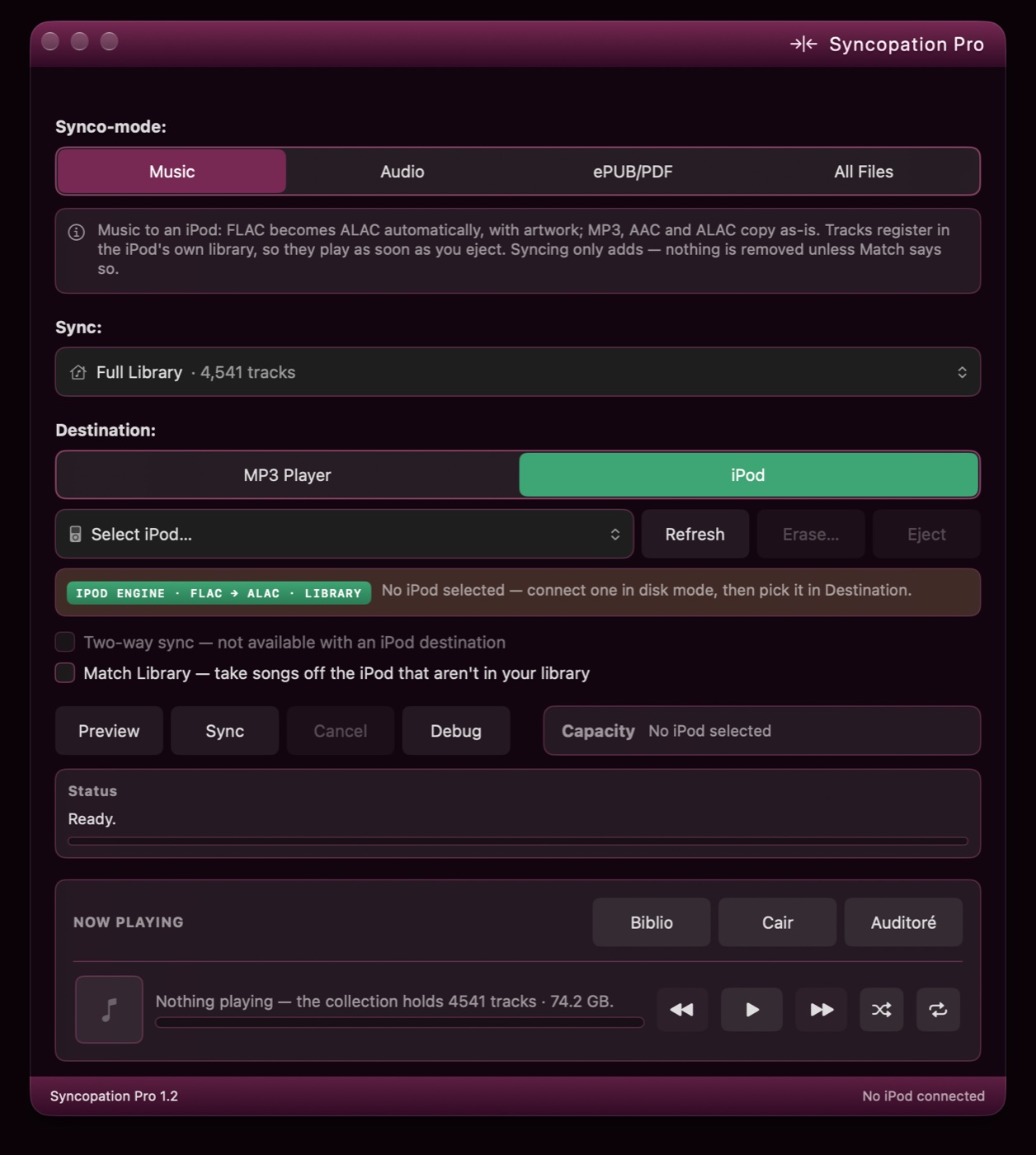
FIG. 01 — 1.2, PHOTOGRAPHED. LIQUID GLASS SWITCHED OFF FOR THE SITTING.
THE PURPLE IS NOT A THEME, IT IS A POSITION.
“The greatest deception men suffer is mistaking access for possession. He who is fixed to a subscription does not own his library. The stream was once a file, and it never became anything better than a file.”
Objection on file · “it's just a file copier”
Sustained — for three of the four modes, on purpose. Music, ePUB/PDF and All Files move your bytes untouched, because a file you can't drag back out with Finder was never really yours. The difference is everything a drag-and-drop doesn't do:
- Knows what's already there. By tags, not filenames — a track some other app put on the device is recognized and skipped, never duplicated.
- Survives a yanked cable. Resumes where it stopped. On an iPod every copy is journaled as it lands, so the stragglers are known by name, not guessed from timestamps.
- Knows whether it fits before it starts. Capacity is priced at the size files will land — not an error dialog at 97 percent.
- Runs in both directions. Two-way sync, or Match Default Source: your player becomes a mirror of your folder, deletions included. Pro.
- Files audiobooks as audiobooks. On an iPod: resume where you stopped, kept out of shuffle.
- Stays awake. The Mac doesn't nap at track 600 of 4,000.
- And the fourth mode isn't copying at all. An iPod ignores anything it didn't register itself. iPod mode writes the device's library database, signs it with the checksum the firmware demands, converts FLAC into something a 2009 iPod actually plays, and paints the artwork in the device's own format.
- None of that is in a drag-and-drop. It isn't in a weekend, either. The research is in File 04.
Pro and CE.
Same engine. Different clearance levels.
CE is not a demo, not a trial, and not crippleware — it's the full sync engine, free, under GPL v3, and it's our contribution to the open-source community: real code, openly licensed, patches welcome. Pro is what happens when the engine gets a valet, a tailor, and a direct line to the person who built it.
| Capability | Syncopation Pro | Syncopation CE |
|---|---|---|
| Price | $19.99 until Dec 31, 2026 — then $24.99. One-time. Not a subscription. Never a subscription. | Free GPL v3, source on GitHub |
| Ownership | You own itbuy it once, it's yours — every update through the life of the major version is free. The next major version is a new decision, not a renewal. | You own it twiceit's GPL — you own the binary and the blueprints |
| Writes the iPod's own library database | Includedan iPod plays only what's registered in a hidden library file — and every iPod classic — and the nano 3G and 4G — won't accept that file unless it carries hash58: a checksum keyed to the hardware ID of that one iPod. Get it wrong and the device pretends the music isn't there. Syncopation computes it natively; no fruit software is installed, opened, or consulted. | Includedsame engine, same signature — we told you it wasn't crippleware |
| All four Synco-modes | Included | Included |
| Device identification | Names your exact hardware“iPod classic (7th gen)” — clean-room table, 196 models of the click-wheel era | Names the family“iPod classic” — and that's all it will say |
| Album artwork on the iPod | Yescovers pulled from your files and rendered in the device's own thumbnail formats | — |
| Already-there detection | By tagsa track is recognized even if another app put it there — never duplicated | By filesame file, same place, skipped |
| Cable knocked out mid-sync | Carries oneverything saved at the last checkpoint plays; the next sync resumes from there | Stops cleanlyhalf-copied files are tidied up on the next run |
| Stranded files | Reclaimedaudio other software left behind, invisible and unplayable — 33.8 GB back on one 160 GB classic | Reclaimedsame tidy-up, from 1.2.2 |
| The same song twice | Folded to onea duplicate on a card or an iPod is collapsed at the start of a sync — title, artist, album and byte size must all match, so a distinct edit is never taken for a twin. No erase. | Folded to onesame test, from 1.2.2 |
| FLAC → ALAC, on the fly | Includedclick-wheel iPods don't play FLAC, so each file becomes Apple Lossless on its way to the device — 16-bit, at a rate the firmware actually plays — nothing pre-converted, nothing left behind. Before the first byte moves the sync is priced at the size it will land: about 8 MB a minute of CD-quality audio, roughly 300 MB an album, hi-res counted at what it shrinks to (a 24-bit/96 kHz album arrives at about a third of its size at home). A 160 GB classic works out to roughly 4,000 lossless tracks, and a sync either fits or says so before it starts. iPod mode only — every other mode copies your bytes untouched. | Includedsame converter, same arithmetic |
| Faster syncs to old iPods | Includedthe next track converts while the last one copies — processor and cable work at the same time instead of taking turns — and the Mac stays awake until the sync is done | Included |
| Big libraries | Journaled exportpast a few hundred tracks a first sync stops being one long transfer and becomes a series of saved ones: every file is logged the instant it lands on the iPod, and the library is written out every 250 tracks. A 4,000-track load onto a classic is sixteen short commitments instead of one marathon — lose the cable at track 3,100 and 3,000 already play. The stragglers are known by name from the log, not guessed from timestamps, and tidied up on the next run. | One write at the endthe library is written once, when the sync finishes |
| Podcasts † & audiobooks | Synco-podaudiobooks filed as what they are: resume where you stopped, kept out of shuffle. DRM-free only. Podcasts file to the iPod's own Podcasts menu the same way, from 1.2 | Synco-podsame filing, same flags |
| Library † | Synco-biblioyour collection as a shelf and as a wall of covers — playlists, playback, import, the Mac's own Now Playing and media keys following along; one playlist or all of it to the iPod | — |
| Album art & names † | Synco-cairmissing covers, thumbnails and wrong album names looked up across the free music databases and put right — the sure ones on their own, the rest with one click; audio never re-encoded | — |
| Organize music files & folders † | Synco-cairevery track identified and filed into its real Artist / Album folder — album, artist, title, track and disc number, genre, year and cover all put right; the sure ones on their own, the rest with one click; file formats preserved | — |
| iPod shuffle ‡ | Synco-shufflé4th generation — its own list written natively, and it talks: track names and status messages recorded on your Mac in a voice you pick. Whole library or one playlist. | — |
| Rockbox players ‡ | Yesan MP3 player to Synco — music files are managed as expected | — |
| Equalizer † | Synco-auditoréfive bands and gain on playback — live, remembered between launches | — |
| Sound when a sync finishes | Includedyour own alert tone | Included |
| Two-way sync * | Yeseach side ends up with everything | — |
| Match Default Source | Yesyour iPod or MP3 player becomes a mirror of your folder, deletions included | — |
| Accessibility | Liquid Glass (macOS 26 and up)transparency, System, Light, Dark mode on every supported macOS, Ventura included — each switchable | System, Light, Dark modeflat, honest functionality |
| Distribution | Mac App Storesandboxed, notarized, reviewed by Apple | GitHubclone it, build it, own it |
| Support | GitHub Issues — answered by the developer | GitHub Issues — answered by the community, often also the developer |
* TWO-WAY SYNC IS NOT AVAILABLE IN iPOD MODE.
** AUDIOBOOKS ARE AVAILABLE NOW; PODCASTS FILE THE SAME WAY FROM 1.2.
† ARRIVED WITH 1.2.2. ‡ ARRIVES WITH 1.3 — PENDING APPLE APPROVAL.
PRICING DISCLOSURE: $19.99 IS AN INTRODUCTORY PRICE, NOT A COUNTDOWN-TIMER PSY-OP. ON JAN 1, 2027 IT BECOMES $24.99 AND STAYS THERE.
For people who want their exact iPod greeted by name, their sync running both directions, and their money buying software instead of renting it.
Get ProFor people who read build scripts for fun. The full engine under GPL v3 — our contribution to the open-source community. Patches welcome, forks legal, gratitude optional. If you outgrow it, Pro will be here. If you don't, that's fine too.
Get CEWhy Pro only ships through the Mac App Store.
You're about to trust an app from a stranger on the internet with hardware Apple stopped defending fifteen years ago. So we let Apple screen us first.
Sandboxed
The App Store build runs in Apple's sandbox. It touches exactly the folders and devices you grant it — it physically cannot wander. You'll see the system's Choose panel once per volume; that's the sandbox working, not the app being needy.
Reviewed & notarized
Every update passes Apple's review and notarization before it reaches you. No “download this .dmg from our site and trust us.”
Data collected: none
The App Store privacy label reads “Data Not Collected.” Not anonymized. Not aggregated. Not collected. Your taste is not a product here — nothing studies your mood, wraps your year in December, or sells your listening habits to advertisers. We'll leave that to a certain shade of green.
Apple handles the money
Purchases, refunds, and updates ride Apple's rails. One price, one receipt, and your license follows your Apple ID — no license keys to lose.
Nothing else installed
No helper daemons, no launch agents, no kernel extensions, no menu-bar residue. Delete the app and it is gone. The music on your devices never depended on it in the first place.
One build, no special editions
The build in the store is the build we run. No developer edition with extra powers, no unlocked download for friends. One codebase, one certificate, one behavior.
The receipts.
Syncopation Pro, itemized. Everything below is native Swift. No Electron, no bundled browser, no 200 MB of Chromium cosplaying as a utility. The binary is measured in megabytes.
Field notes · why there's an engine at all
A click-wheel iPod plays exactly one thing: tracks registered in a binary library file, in a hidden folder, in a format its maker never published. For most of two decades the only open reference for that format was a C library written for Linux desktops — it drags in half a desktop's worth of dependencies and was never going to pass through the Mac App Store sandbox. So Syncopation's engine was written new, in Swift, with the published format notes on one screen and three iPods on the bench. The one routine carried across — the checksum — keeps its original credit in the source. What it took to get a 2009 iPod to say yes, itemized:
- Nine sections, in one order. The firmware expects the exact section set and sequence the original software writes — albums before tracks, of all things. Deviate and the iPod reboots to its restore screen with the filesystem perfectly intact.
- Section five is the menu. One section holds six “smart playlists” — Music, Videos, Movies, TV Shows, Audiobooks, Rentals. They aren't playlists; they're the iPod's main menu. Write it empty and the device asks to be restored. That lesson cost a nano.
- The signature. Every iPod classic, and the nano 3G and 4G, refuses a library that isn't signed with hash58, a checksum keyed to the device's own hardware ID. The Swift routine is verified bit-identical against an independent implementation — and, more to the point, accepted by the hardware.
- The iPod misdescribes itself. The classic's system-info file is empty, and its extended one is malformed XML that any strict parser rejects. Detection has to read it the way a person would.
- 32 bits of stutter. The obvious FLAC-to-ALAC conversion on a Mac yields 32-bit ALAC. The iPod can't play it — tracks blip and skip. The fix is a 16-bit intermediate, with hi-res rates halved to the firmware's 48 kHz ceiling.
- One file in 4,541. The system decoder will reject a FLAC outright over a seektable it dislikes, before reading a frame of audio. A second decoder catches what the first refuses.
- Artwork in the device's dialect. Covers are written in the iPod's own 16-bit thumbnail format plus its artwork database, validated byte-for-byte against the reference.
- Proven on metal. Not a simulator, not a spec sheet: nano 1G (2005), nano 3G (2007), classic (2009), shuffle 4G (2010). The shuffle has been forgiven.
Audio-agnostic by design
The iPod gets the headlines; the engine doesn't play favorites. Music mode loads SD cards and any audio player that mounts as storage — Rockbox players included — folder structure intact, formats untouched. Interrupted syncs resume where they stopped, and a track the engine has seen once is never copied twice, even one some other app put there.
Own database engine
Syncopation writes the iPod's iTunesDB natively — tracks, albums, sort indexes — including the hash58 checksum newer click-wheel firmware demands. No iTunes, no Music.app, no borrowed runtime.
Audio pipeline
FLAC → ALAC conversion, iPod mode only — and done correctly: a 16-bit pipeline the firmware actually plays (naive conversions skip and stutter), with hi-res material downsampled to the classic's 48 kHz ceiling automatically. In every other mode, your files travel byte-for-byte untouched.
What fits
Before a sync starts, every converted track is priced at its landing size — length × 16-bit stereo × the target rate, × 0.75 for Apple Lossless, never more than the source — so the space check is honest in both directions.
≈ 8 MB PER MINUTE
≈ 300 MB PER ALBUM
≈ ½ GB PER HOUR
160 GB CLASSIC ≈ 330 HOURS ≈ 4,000 TRACKS
24-BIT / 96 kHz → ABOUT A THIRD OF ITS SIZE
Artwork
Cover art extracted from your files and written as the iPod's native RGB565 ithmb + ArtworkDB format, validated byte-for-byte against reference implementations.
Era coverage
Works with iPod classic, video, nano (1st–4th gen), mini, and photo in disk mode — from 2005-era firmware (plain databases) through the final classic (hash58) — and, with 1.3, the shuffle (4th gen), pending Apple approval. Touch and iPhone are not supported. The shuffle has been forgiven.
HARDWARE-PROVEN: nano 1G (2005) · nano 3G (2007) · classic (2009) · shuffle 4G (2010)
Requirements
macOS 13.0 Ventura or later. Universal binary — Apple silicon and Intel. An iPod in disk mode, or any player, reader, or drive that mounts as storage.
Deep documentation
The technical notes are public — database formats, firmware quirks, conversion pitfalls — because the next person shouldn't have to rediscover them.
Now Playing, the Mac's own
Play a track in Synco-biblio and the system's Now Playing follows — track, cover and position in Control Center and the menu bar. The keyboard's media keys and the buttons on your headphones play, pause, skip and scrub it. Arrives with 1.2.
PLAY · PAUSE · NEXT · PREVIOUS · SCRUB — FROM ANYWHERE THE MAC LISTENS
What happens next.
Some of the roadmap has been cleared for release. The rest of this page has been reviewed by the facility and redacted where appropriate. Do not adjust your monitor.
- Cleared for release
- Artwork backfill for tracks already on the device shipped · 1.0
- Mirror & clear-all device maintenance shipped · 1.0
- iPod shuffle support — 4th generation, and it talks 1.3 · pending Apple approval
- Rockbox players — if it mounts, it is a target 1.3 · pending Apple approval
- Syncopation CE, free, on the Mac App Store
- A manager for the collection itself — covers, album names, playlists, an equalizer, the Mac's own Now Playing. Released as 1.2.2 on September 14; the dispatch has the particulars.
- 1.4 · Raffeimentó — refinement. Not begun; who knows what we'll make.
- Not cleared
- SCOPE: not an accessory to your library. A full-feature application — the whole job, end to end.
- SUBJECT: players without an apple on the back. If it mounts, it is a target.
- TIMELINE: when it is ready and not one day sooner
If you can read the black bars, report to decontamination. // Cloud clearance: DENIED